Search This Blog

Showing posts with label Web Service. Show all posts

Services for Prompt Table and Translate Value Look Up

There are scenarios where a component is integrated with a third party interface to provide service. Say for example, integration Campus Solutions via AAWs using .Net. 

The entire CS functionality is exposed to the interface which has numerous PS delivered Prompts and Translate values. 

How to make sure that the integrated fields refers to the right values and prompts in this situation. Best way is to have a service which tells you the prompt and field values and share it with the third party interface to bind that up to create the drop downs.

And you don't have to create one as there are delivered services which does this job. The service PTLOOKUP retrieves the list of values from PeopleSoft and aid the development efforts.

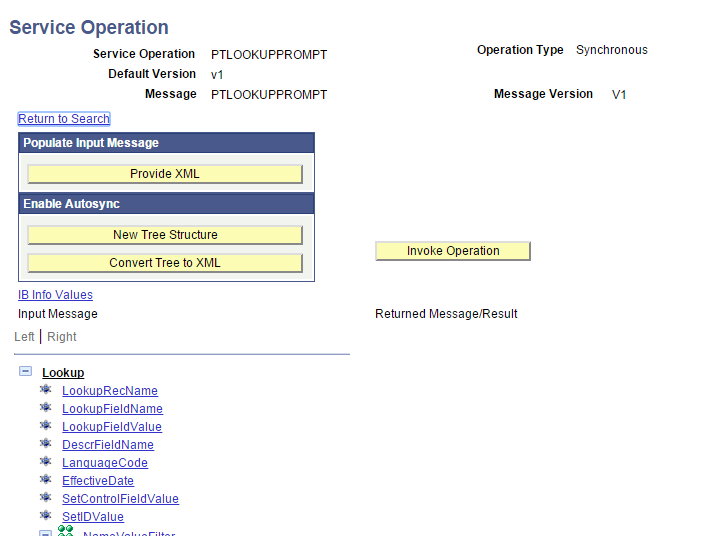
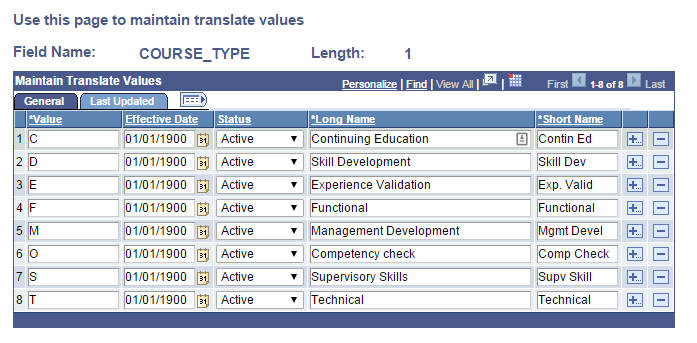
The two service operations PTLOOKUPPROMT and PTLOOKUPXLAT

The best way to understand how it works and the expected parameters is to go and test it with the test utility. 

You might get a node error initially, then make sure you have an instance to instance routing defined on the respective SO routing tab.

PTLOOKUPPROMT Example:


PTLOOKUPXLAT Example:


Get a value from the XML

Okay so this is the scenario. You've got a response from the XML request you places via Integration Broker and you want to extract the data from a specific tag for further processing. The below code will help you to accomplish the same.

&lmsgGoRequest = CreateMessage(Operation.OPERATION_NAME, %IntBroker_Request);
&lmsgGoRequest.SetXmlDoc(&lxmlDoc);
&lmsgGoResponse = %IntBroker.SyncRequest(&lmsgGoRequest);
&MyDoc = CreateXmlDoc(&lmsgGoResponse.GenXMLString());
&field1List = &MyDoc.GetElementsByTagName("EMPLID");
WinMessage(&field1List [1].NodeValue);

&field1List is the array of the tags fetched from the XML (which you have specified) and NodeValue gives you the value of the tag.

Hope it helps!

Testing Web Service with SendMaster utility

It was in version 9.1 in which first I tried creating a Web Service to GET and POST the data. This was fairly an easy job coz in 9.1 we have delivered SOAP tester. We can use it right after Generating the SOAP template, which is under the Service Utilities.


Click to expand the picture
However while trying to help a colleague I found that in 9.0 the Invoke Service Operation button is not available and we brought up the Send Master Utility.

Now I want to write about how to test a WSDL in Send Master. See the screenshot below.

Click to expand the picture

The Service URL: It is the gateway URL.
In the Header box if it is not populating by itself; you have to type it out. But be sure that the SOAP action is correct. How to get that?

For getting the SOAP action, hit the wsdl on the browser and search for the soapAction.

Consuming Web Service

Thank you Rapheal for sharing the document. All this is an informative one.

Import/Export WebService

Export Message Schema

set log c:\Temp\webservice_qac\PSIBMSGSCHEMA_EXP.log;

set output c:\Temp\webservice_qac\PSIBMSGSCHEMA_EXP.dat;

export PSIBMSGSCHEMA

  WHERE MSGNAME IN ('M113977','M384127','M484624',' M580849','M594368','M626443') AND APMSGVER = 'V1';


Export WebService

set log c:\Temp\webservice_qac\PSIBWSDL_EXP_Web_Services.log;

set output c:\Temp\webservice_qac\PSIBWSDL_EXP_Web_Services.dat;

export PSIBWSDL

  WHERE IB_WSDLNAME in ('CI _PI_JOB_V2.1');


Import message 

SET INPUT c:\Temp\webservice_qac\PSIBMSGSCHEMA_EXP.dat;

SET LOG c:\Temp\webservice_qac\PSIBMSGSCHEMA_IMP.LOG;

set no record;


delete from PSIBMSGSCHEMA

WHERE MSGNAME IN ('M113977','M384127','M484624',' M580849','M594368','M626443')  AND APMSGVER = 'V1';

import *;


Import WSDL

SET INPUT c:\TEMP\webservice_qac\PSIBWSDL_EXP_Web_Services.dat;

SET LOG c:\TEMP\webservice_qac\PSIBWSDL_EXP_Web_Services.log;

set no record;


delete from PSIBWSDL

  WHERE IB_WSDLNAME in ('CI_PI_JOB_V2.1');

import *;


Anoop Sasikala


Why UDDI Is Important

Attempting to create a Service Oriented Enterprise without a Service Registry is destined for trouble; here is how UDDI can help

Web Services are a great advance in our quest for the Service Oriented Enterprise, but most enterprises overlook the importance of a Service Registry (UDDI). This article outlines reasons why UDDI is critical to successful SOA initiatives and reviews recent enhancements to the UDDI standard.

What is a Service Registry?

A service registry is a central repository that allows for the cataloging of services throughout the enterprise. This catalog provides service consumers a place to search for details about service providers, the functional areas (taxonomies) these services address and binding details (location, contract, transport, etc.) for services.

The analogy often used is that of the telephone directory, but I think DNS (Domain Name System) is also a good fit. DNS is something we all understand at least at some level. DNS helps us as humans find computers which only know each other as IP Addresses (numbers). There is a similar parallel with a service registry. Service registries help us as service consumers (people) find services in a simple and centralized manner. They go one step further, however, and help consumers (programs) know how specifically to communicate with them as well.

UDDI

Universal Description Discovery and Integration (UDDI) is the accepted standard for service registries in the SOA context. It is now in its third version and has added important features that really make it the only practical choice for service registry. There are many UDDI servers (i.e. products) available; every large software vendor produces one. There are also many open source servers available as well. The good news is that they mostly implement the entire specification; even the free ones.

Continuing the telephone directory analogy, UDDI consists of three types of directories:

• White Pages – which identify organizations (companies, or more likely departments)

• Yellow Pages – which categorize services (like AP, Purchase Order, etc)

• Green Pages – bindings or details for specific services

The three pages represent a hierarchy--presented above from top down. One organization may (and should) have multiple categories of services, each with multiple service binding options.

Why use the Registry?

The registry really addresses many problems inherent in the enterprise: namely communication and responsibility (ownership). The existence of a registry allows others in the enterprise to see who (person or department) owns a service and who can be contacted for further details as well as where this service exists and how to communicate with it on a technical level (more on this last part later).

The ownership part is critical and it starts off by making the service landscape more open and transparent. I have worked with clients large and small that inadvertently created duplicate services (or worse yet skipped the service that existed and went directly to the data source) because they were unaware of services existing to perform tasks they needed. This is not only a major lapse in communication, but also in governance.

In addition to existence, ownership can be easily and clearly established. Services are like middleware in that they don’t have a User Interface that management sees and is reminded about. Being autonomous by nature it is possible for services to simply run for years without anyone really being responsible for them. This is a mistake because when there are problems consumers won’t know where to turn for help. Ownership in the registry removes this ambiguity and helps keep a clean line of communication between providers and consumers (the people, not the programs in this case).

From an operational standpoint the registry allows service providers to publish secondary versions of their services to be used for testing, disaster recovery, and the like. This creates more fluidity and provides better certainty in service capabilities for users. Critically, it also allows providers to change the location of their services dynamically. When used properly a service consumer does not directly reference a service address, but instead queries UDDI and uses the resulting service information to communicate with the service. It is this level of directory indirection that makes UDDI operationally so powerful.

Many companies rely on DNS, router, or client configuration updates to facilitate moving services. This last part is really the most damning. If your consumer applications need to change for something as simple as a service location change then you are clearly violating core principles of Service Orientation. Alas this is the missing link in most enterprises’ foray into Service Orientation: without UDDI most efforts simply result in point to point service calls. As the web of services grows their manual management becomes a burden too great to sustain.

IT and SOA Governance get a lot of attention today and in many ways they tie to the concepts discussed above about ownership and existence. The last critical piece of the registry trifecta comes from requiring all services to be listed in the registry, and requiring consumers to use the registry. Once that’s accomplished service governance becomes a very simple affair. In fact, subscriptions in UDDI v3 allow for governance notifications when any aspect of the registry changes. This can be details of a service binding or transport, changes to a contract, or even just changes to the human contact information.

Why do so many people hate UDDI?

In part UDDI was a victim of technology marketing hype (indeed much like SOA nearly was). The major vendors (including IBM, Microsoft and SAP) all created public registries for web services believing (or trying to mandate) that companies would make many services publically accessible and searchable. There was an effort to push UDDI as a sort of DNS and Search Engine for web services. That this did not materialize in the manner first imagined should be no surprise. When UDDI hit the world there had not yet been a standardized security approach (WS-Security). This would make a public exchange of services troublesome to say the least. Yet many successful technologies flourish in applications other than their original intention.

Hurting UDDI further were a heavy use of Universally Unique Identifiers (UUIDs) which are great for computers, but terrible for people, as well as a less flexible taxonomy (both issues which have been rectified in the newest versions). UDDI was pushed, it seems, as some sort of external service to facilitate exchange between companies. In my experience UDDI fits much better in the internal role providing registry and governance capabilities to the enterprise itself.

How can an enterprise start being successful with UDDI?

The first place enterprises can begin succeeding is by simply starting to use UDDI and to mandate its centralized use and administration. Although global adoption is the best way, even one department using it is a good start. Critically, using Web Services in a point to point manner must stop. All web service access should be performed using UDDI lookups

UDDI should be leveraged to provide visibility into service existence, ownership, and technical implementation. By searching categories (taxonomies) developers or managers will be able to plan projects knowing what services exist to aid development. When gaps are found and services must be created they should embrace the concepts of SOA and create a true reusable service rather than just a point to point solution. This service should then be entered into the registry. The beautiful thing about UDDI and SOA in general is that even if you start with one type of UDDI server you should be able to switch between vendors quite easily.

Important changes in UDDI v3

The virtue of UDDI has been made even more attractive by smart revisions to the UDDI standard. The latest version of UDDI introduces some critically important features, some of which have already been introduced.

The following features will be presented in more detail in future articles:

• Multi-Registry support (making UDDI function even more like DNS).

• Support for digital signatures to verify the validity of registry entries.

• Expanded query support.

• Subscription API.

Conclusion

We have seen what UDDI can provide us as well as how it has changed recently. We covered how existence and ownership being visible and open helps an enterprise better manage and plan its service assets. We also covered how the registry can allow the changing of service details (like address) without changes to consumers. When we think of what Service Registry/UDDI can do for our enterprise, the choice should be clear. UDDI is not a luxury, but a necessity for web services in general and Service Orientation in particular.


Source CIO.com

Amazon Web Services (AWS)

The Amazon Web Services (AWS) are a collection of remote computing services (also called web services) offered over the Internet by Amazon.com.

Launched in July 2002, Amazon Web Services provide online services for other web sites or client-side applications. Most of these services are not exposed directly to end users, but instead offer functionality that other developers can use. In June 2007, Amazon claimed that more than 330,000 developers had signed up to use Amazon Web Services.

Amazon Web Services’ offerings are accessed over HTTP, using REST and SOAP protocols. All are billed on usage, with the exact form of usage varying from service to service.


List of AWS services:

·         Amazon Elastic Compute Cloud (EC2), providing scalable virtual private servers using Xen.

·         Amazon Elastic Block Store (EBS), providing persistent block level storage volumes for EC2.

·         Amazon Simple Storage Service (S3), providing Web Service based storage for applications.

·         Amazon Simple Queue Service (SQS), providing a hosted message queue for web applications.

·         Amazon Mechanical Turk (Mturk), managing small units of work distributed amongst many people.

·         Alexa Web Services, providing traffic data, thumbnails, and other information about web sites.

·         Amazon Associates Web Service (A2S, formerly Amazon E-Commerce Service or ECS), providing access to Amazon's product data and electronic commerce functionality.

·         Amazon Historical Pricing, providing access to Amazon's historical sales data from its affiliates. (Appears this service has been discontinued)

·         Amazon Flexible Payments Service (FPS), currently in limited beta[2], provides an interface for micropayments.

·         Amazon DevPay, currently in limited beta, is a billing and account management system for applications that developers have built atop Amazon Web Services.

·         Amazon SimpleDB, currently in limited beta, allows developers to run queries on structured data. It operates in concert with EC2 and S3 to provide "the core functionality of a database."[3]

·         Amazon AWS Authentication is an implicit service, the authentication infrastructure used to authenticate access to the various services.

·         Amazon Fulfillment Web Service provides a programmatic web service for sellers to ship items to and from Amazon using Fulfillment by Amazon.

·         Amazon CloudFront, a content delivery network (CDN) for distributing objects stored in S3 to so-called "edge locations" near the requester.

·         AWS Management Console (AWS Console), A web-based point and click interface to manage and monitor the Amazon infrastructure suite including EC2, EBS, Amazon Elastic MapReduce, and Amazon CloudFront.

·         Amazon Elastic MapReduce, a web service that enables businesses, researchers, data analysts, and developers to easily and cost-effectively process vast amounts of data. It utilizes a hosted Hadoop framework running on the web-scale infrastructure of EC2 and Amazon S3.

·         Amazon Virtual Private Cloud (VPC), in limited beta, a web service that creates a logically isolated set of Amazon EC2 instances to be connected to an existing network using a VPN connection.


Similar or related services:


IBM has announced Blue Cloud, a service based on Linux, Hadoop, Xen, and PowerVM. RightScale and 3Tera offer administration tools to manage seamlessly machines based on different data centers operated by Internet hosting services around the world. opsource Offers a similar service too.

Google App Engine was released in April 2008 and allows web applications to be deployed to Google infrastructure.

Microsoft has announced Windows Azure and the Azure Services Platform, a similar cloud-computing infrastructure intended to host both managed and unmanaged .Net applications. It is free like Google App Engine, however a token is needed, and are in limited supply [4]

Rackspace has released a similar cloud-computing platform under the brand Mosso, which includes Cloud Sites, Cloud Files, and Cloud Servers while ServePath has done the same under the brand GoGrid.

RightScale provides a service to help manage your cloud, this can also be done via Amazon's API, or Amazon's web based management console. Amazon's management console however does not offer control over all features supported by AWS.


CTY: Wikipedia.Org


Web Service,WSDL,SOAP overview

A Web Service (also Webservice) is defined by the W3C as "a software system designed to support interoperable machine-to-machine interaction over a network. It has an interface described in a machine-processable format (specifically WSDL). Other systems interact with the Web service in a manner prescribed by its description using SOAP-messages, typically conveyed using HTTP with an XML serialization in conjunction with other Web-related standards."Web services are frequently just Internet Application Programming Interfaces (API) that can be accessed over a network, such as the Internet, and executed on a remote system hosting the requested services. Other approaches with nearly the same functionality as web services are Object Management Group's (OMG) Common Object Request Broker Architecture (CORBA), Microsoft's Distributed Component Object Model (DCOM) or Sun Microsystems's Java/Remote Method Invocation (RMI).

In common usage the term refers to clients and servers that communicate over the Hypertext Transfer Protocol (HTTP) protocol used on the Web

The Web Services Description Language (WSDL) is an XML-based language that provides a model for describing Web services

WSDL is often used in combination with SOAP and an XML Schema to provide web services over the Internet. A client program connecting to a web service can read the WSDL to determine what operations are available on the server. Any special data types used are embedded in the WSDL file in the form of XML Schema. The client can then use SOAP to actually call one of the operations listed in the WSDL.


SOAP, originally defined as Simple Object Access Protocol, is a protocol specification for exchanging structured information in the implementation of Web Services in computer networks. It relies on Extensible Markup Language (XML) as its message format, and usually relies on other Application Layer protocols (most notably Remote Procedure Call (RPC) and HTTP) for message negotiation and transmission. SOAP can form the foundation layer of a web services protocol stack, providing a basic messaging framework upon which web services can be built.

As a layman's example of how SOAP procedures can be used, a SOAP message could be sent to a web service enabled web site (for example, a house price database) with the parameters needed for a search. The site would then return an XML-formatted document with the resulting data (prices, location, features, etc). Because the data is returned in a standardized machine-parseable format, it could then be integrated directly into a third-party site.